> ## Documentation Index
> Fetch the complete documentation index at: https://docs.supaboard.ai/llms.txt
> Use this file to discover all available pages before exploring further.
# Set up an agent for your team
> Give an agent the data access, definitions, and examples it needs for reliable answers.
Create an agent for a subject your team asks about regularly, such as revenue or customer success. Its data scope and business knowledge help the Analyst answer those questions consistently.
## Before you begin
You need access to **Agents**, permission to create an agent, and at least one active data source. Gather important metric definitions, exclusions, and example questions with known answers.
## 1. Create the agent
Open **Agents → New Agent**. Enter an **Agent Name**, choose its look, select **Data Source Access**, and review **User Access**.
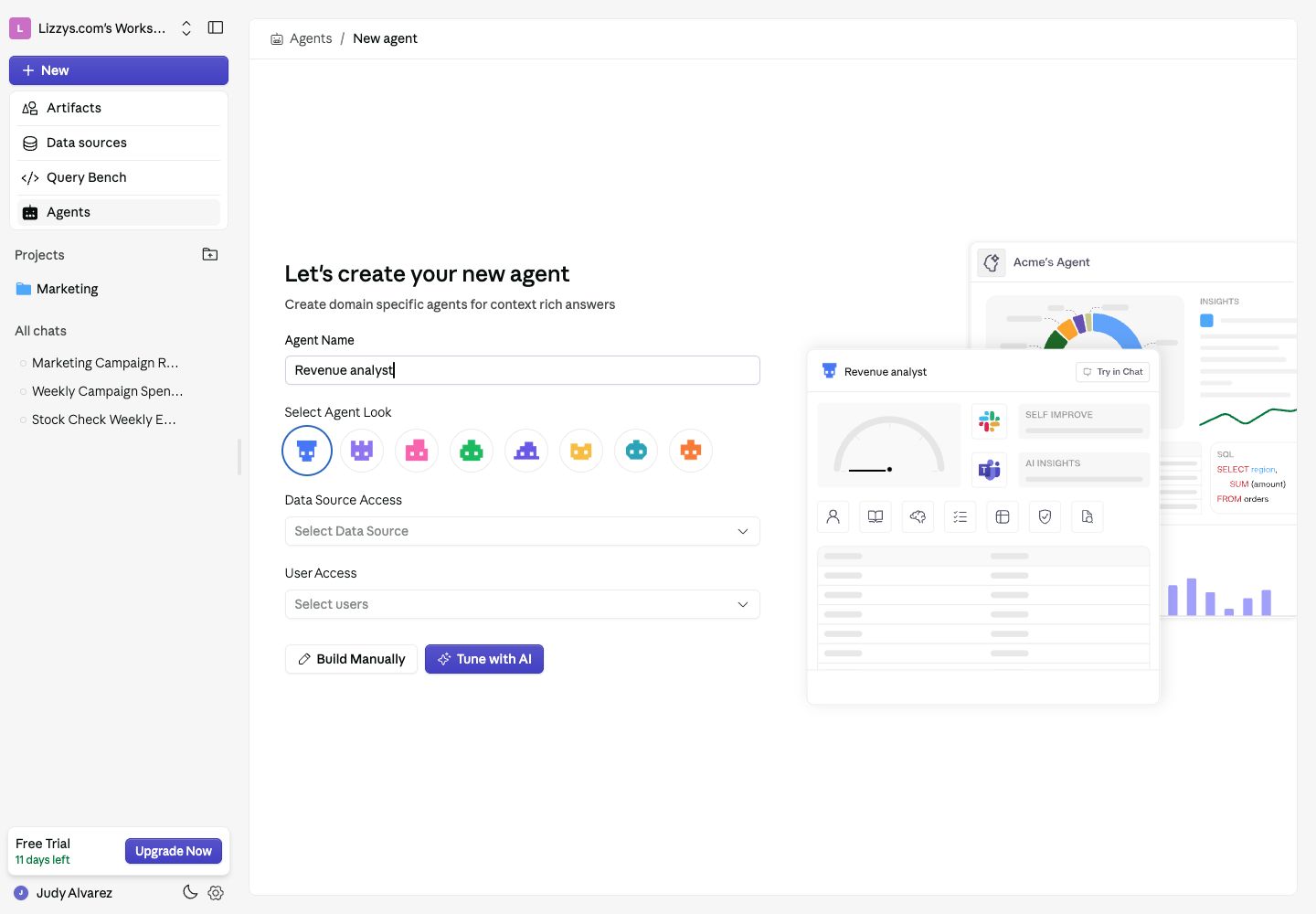 Choose **Tune with AI** for guided setup, or **Build Manually** to configure the agent yourself.
## 2. Explain your business
In **Who am I**, describe the agent's purpose and the business context it needs. Use **Table Configuration** for table meanings and known gotchas. Upload reference documents to **Knowledge Base**.
Be specific. “Revenue excludes cancelled orders and uses the order date” is more useful than “Give accurate revenue answers.” Confirm that this definition matches your business before using it.
## 3. Add rules and examples
Use **Rules** for instructions the agent should follow consistently. Add **Verified Queries** for important questions whose answers you have checked. Keep source permissions limited to the data relevant to the agent's purpose.
## 4. Test the agent
Choose **Try in Chat** and ask a small set of questions with known answers. Include a follow-up and a question with an ambiguous definition. Check both the result and the explanation.
Run an **Evaluation** when configured, inspect the issues, and correct the underlying definitions or examples before testing again.
## 5. Make it available
Review **User Access** so the intended teammates can select the agent in the Analyst. If someone cannot use it, check their workspace feature access and the agent's access list.
## Expected result
Your teammates can select the agent, and its answers use the intended data scope and definitions. Keep reviewing feedback and retained memory as your data changes.
## Next steps
Use the [agent reference](/agents/overview) for each configuration area, or [connect MCP tools](/agents/tools) for access to an external service.
This documentation is built and hosted on [Mintlify](https://mintlify.com), a developer documentation platform.
Choose **Tune with AI** for guided setup, or **Build Manually** to configure the agent yourself.
## 2. Explain your business
In **Who am I**, describe the agent's purpose and the business context it needs. Use **Table Configuration** for table meanings and known gotchas. Upload reference documents to **Knowledge Base**.
Be specific. “Revenue excludes cancelled orders and uses the order date” is more useful than “Give accurate revenue answers.” Confirm that this definition matches your business before using it.
## 3. Add rules and examples
Use **Rules** for instructions the agent should follow consistently. Add **Verified Queries** for important questions whose answers you have checked. Keep source permissions limited to the data relevant to the agent's purpose.
## 4. Test the agent
Choose **Try in Chat** and ask a small set of questions with known answers. Include a follow-up and a question with an ambiguous definition. Check both the result and the explanation.
Run an **Evaluation** when configured, inspect the issues, and correct the underlying definitions or examples before testing again.
## 5. Make it available
Review **User Access** so the intended teammates can select the agent in the Analyst. If someone cannot use it, check their workspace feature access and the agent's access list.
## Expected result
Your teammates can select the agent, and its answers use the intended data scope and definitions. Keep reviewing feedback and retained memory as your data changes.
## Next steps
Use the [agent reference](/agents/overview) for each configuration area, or [connect MCP tools](/agents/tools) for access to an external service.
This documentation is built and hosted on [Mintlify](https://mintlify.com), a developer documentation platform.